Vidnoz AI in Education: Boosting Student Retention Rates by 25%
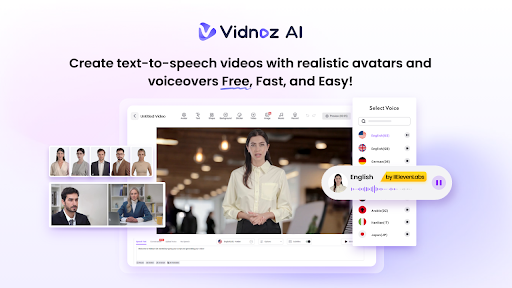
The landscape of modern education is undergoing a seismic shift, driven by the rapid integration of artificial intelligence. As we all know, traditional teaching methods often struggle to capture attention and personalize learning at scale, leading to disengagement and dropout risks. Enter Vidnoz AI — an innovative video creation platform that transforms learning content into interactive, visually compelling experiences. Vidnoz AI makes lessons more engaging than ever. In this guide, we will provide a complete introduction to Vidnoz AI and how this tool helps boost student retention rates by 25%.
Part 1: What is Vidnoz AI?
Vidnoz AI is one of the top-rated AI video generators designed to simplify and accelerate the process of creating high-quality videos. Using advanced artificial intelligence, it allows users to produce professional-grade video content in minutes, without the need for complex editing skills or expensive software. The best part of this tool is that it also offers higher security, ensuring that all your content and data remain safe and protected. It is certified with ISO/IEC 27001:2022 for Information Security Management. Beyond security, Vidnoz AI provides a range of features, including AI-powered voiceovers, customizable templates, and realistic avatars, making it an all-in-one solution for marketers, content creators, and educators.
Part 2: Core Features of Vidnoz AI
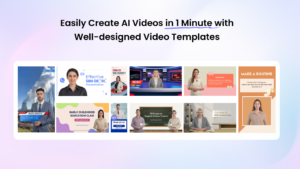
The program provides a comprehensive set of features, making the creation of educational video content simple and efficient. Here are its standout capabilities:
- Pre-Designed Video Templates: Vidnoz AI includes 2800+ video templates, which enable users to create various types of videos, including educational content, product demos, explainer videos, tutorials, and more. The program also offers a great variety of aspect ratio templates, including landscape (1920 x 1080) and portrait (1080 x 1920) to match the display requirements of different devices.
- Likelike AI Avatars: No actor required? Yes, with Vidnoz AI 1700+ realistic avatars, you don’t need any actors for your videos. It offers avatars of teachers, students, customer support, hosts, news reporters, and more. Plus, users can create a digital twin using Avatar Lite, and Avatar Pro offers deeper customization features.
- Engaging AI Voices: The standout feature of Vidnoz AI is that it offers 1830+ AI voices, each with different styles and tones. All voices available on Vidnoz AI are powered by ElevenLabs, Google, and Microsoft. Educators can select voices that match the mood, subject, or audience, making lessons more engaging and easier.
- Free Version: With the help of Vidnoz AI, educators can create videos without spending a single penny. The free version enables users to create 2-minute videos daily and includes amazing features, such as Online Video Editor, AI Voice Changer, AI Video Enhancer, Avatar Lite, and Avatar Pro.
- AI Video Wizard: Another amazing part of Vidnoz AI is that anyone can produce high-quality videos with this program. The program enables users to create engaging content using a simple text prompt or any source material.
Part 3: Step-by-Step Guide: How to Create Educational Content With Vidnoz AI?
With Vidnoz AI, users can create educational content easily. Below, we have mentioned the step-by-step instructions on how to create videos with Vidnoz AI:
- Open your web browser and go to Vidnoz AI’s official site. Log in with your account and click on the “Create Free Video Now” button. Choose Video Template and AI Avatar.
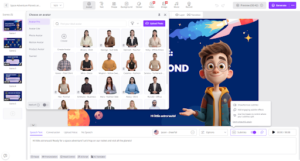
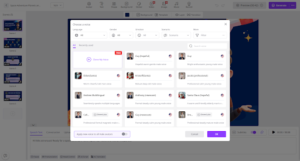
- Input your script and select the AI voice. The program offers 1830+ natural-sounding voices in over 140+ languages.
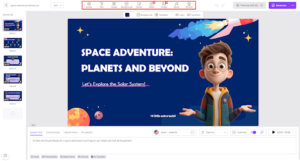
- Next, use the AI Video Editor to customize it according to your needs. It enables users to change the background, insert text, add music, and more.
- Finally, click on the “Generate” button to begin the video creation process. Within seconds, your AI video will be ready. Preview it and click on the “Download” button to export the AI video in a popular format.
Part 4: FAQs Related to Vidnoz AI
-
How Many Languages Does Vidnoz AI Support?
Vidnoz AI supports over 140 languages, enabling users to create videos in multiple languages to reach a broader audience on platforms like YouTube. It includes languages such as English, Chinese, Russian, Turkish, French, Japanese, German, and others.
-
What Makes Vidnoz AI Secure?
Vidnoz AI is ISO/IEC 27001:2022 certified, ensuring data protection, secure storage, and safe collaboration across teams.
-
Can Vidnoz AI Be Used For Educational Content?
Yes, with the help of Vidnoz AI, teachers can easily create educational content and upload it on popular platforms such as YouTube, TikTok, and Instagram. Vidnoz AI makes learning fun and engaging as compared to traditional methods.
Conclusion
If you want to boost student retention rates by 25%, Vidnoz AI is the best option. By transforming traditional lessons into interactive, visually engaging, and personalized video content, it keeps students more focused and motivated to learn.
IX Academy.us offers practical trading education and mindset training. Tamildhoom highlights its courses, helping learners build financial skills and confidence for today’s fast-moving digital economy.