Securing Your Remote Workforce: How iTop VPN Ensures Business Continuity
The workplace hasn’t just changed—it’s been completely reinvented. Remember when working from home was a rare perk? Now, it’s a strategic imperative. Companies of all sizes, from global giants to agile startups, are all-in on remote and hybrid models, chasing clear benefits: better talent, lower costs, and a boost in productivity.
But this new freedom comes with a catch. Our corporate perimeters have vanished. Employees are logging in from kitchen tables, noisy cafes, and airport lounges—often on devices and networks that are anything but secure. This patchwork of connections creates a wide-open backdoor for cyber threats. To lock this door without slowing the team down, you need a solution that’s both fortress-strong and user-friendly. This is where a tool like iTop VPN comes into play. It’s designed to create a secure, encrypted tunnel for all data traffic, effectively making that risky coffee shop Wi-Fi as safe as the office network. For businesses, this means robust protection is in place without complicating the employee’s workday.
iTop VPN: Core Features Supporting Business Continuity
iTop VPN acts like a secure tunnel for your online activity, keeping your business data under lock and key even on public Wi-Fi. It’s built to be reliable and user-friendly, so your team can work from anywhere without a hitch. When evaluating solutions, businesses should prioritize both robust security and operational efficiency. iTop VPN offers a feature set that directly addresses the challenges of securing a remote workforce.
AES-256 Encryption and No-Log Policy
At the heart of iTop VPN is AES-256 encryption, the gold standard for protecting data in transit. Even if traffic were intercepted, it would be unreadable. Combined with a strict no-log policy, businesses can rest assured that neither employee activity nor sensitive data is tracked or stored, preserving both privacy and compliance.
Global Coverage with 3,200+ Servers
For remote teams spread across regions, latency can hinder productivity. iTop VPN’s 3,200+ servers in 100+ locations allow employees to connect to the nearest, fastest node. This not only boosts performance but also provides redundancy for resilience against regional disruptions.
Dedicated IP for Consistent Access
For businesses that require fixed endpoints—such as whitelisted IPs for cloud services—iTop VPN offers dedicated IPs. These guarantee consistent connections, streamline access management, and support systems reliant on static addresses.
Kill Switch for Fail-Safe Protection
A VPN disconnection can expose traffic to unsecured channels. iTop VPN’s kill switch automatically cuts internet access the moment the VPN connection drops. This fail-safe ensures confidential business information never leaks unintentionally.
Split Tunneling for Flexible Performance
Not all traffic requires routing through a VPN. With split tunneling, businesses can configure critical applications—such as ERP systems, CRMs, or communication platforms—to run inside the encrypted tunnel, while less sensitive traffic bypasses it. This optimizes bandwidth while maintaining protection where it matters most.
Integrated Privacy and Security Tools
Beyond tunneling, iTop VPN enhances system protection through built-in tools such as an ad blocker, browser privacy cleaner, and PC security reinforcement features. These safeguards protect employees against phishing, malicious ads, and browser tracking while working remotely.
Multi-Platform Support
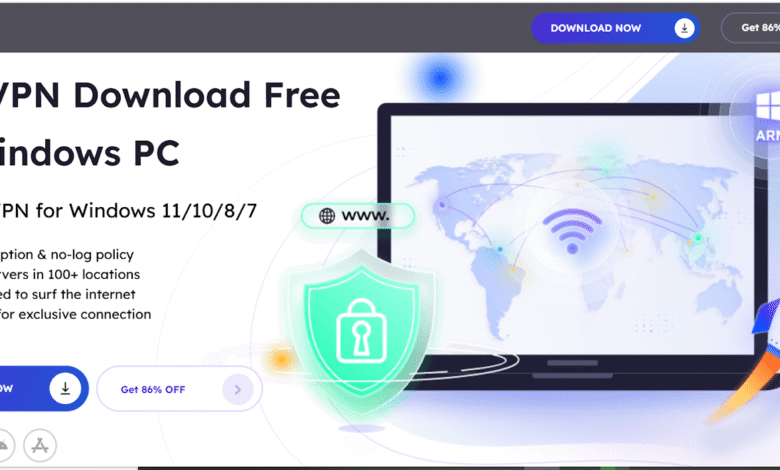
You can connect 8 devices simultaneously, while iTop VPN is available across Windows on ARM devices, Windows, Mac, iOS, and Android, its Windows client—covering Windows 11/10/8/7—is particularly powerful. With one-click connections, auto-server selection, and intuitive dashboards, even non-technical users can secure their devices effortlessly.
How to Use iTop VPN?
Step 1: Download iTop VPN for Windows
Start by visiting the iTop official website:
iTop VPN for Windows
- Click “Download Now” to get the setup file
- Run the installer and follow the easy prompts
- Installation is lightweight and completes in minutes
iTop VPN is also available for other platforms, making it a versatile tool for desktops, laptops, and mobile devices.
Step 2: Connect to a Secure VPN Server
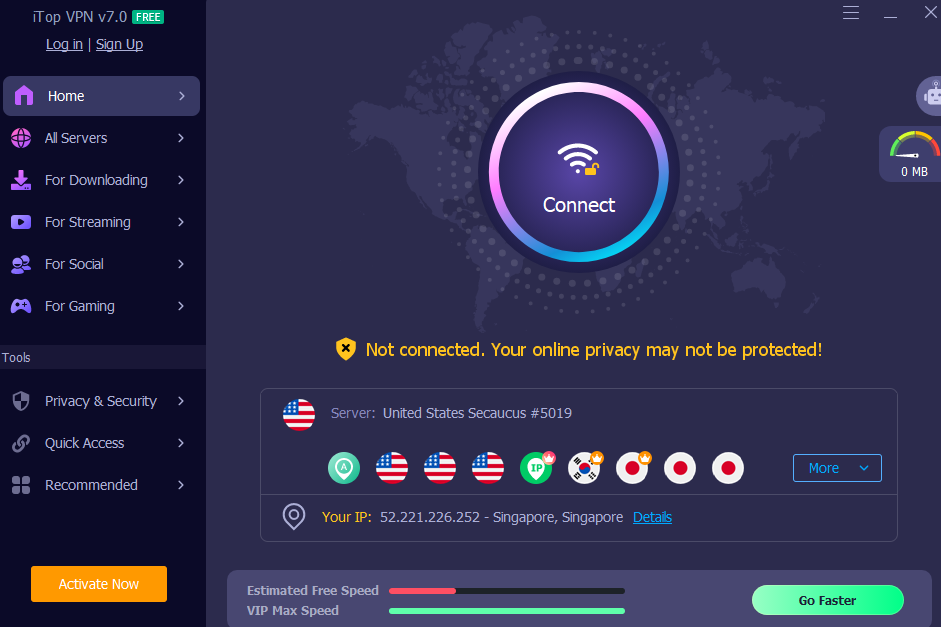
Once inside the dashboard, you’ll see a large “Connect” button. Click it, and iTop VPN will automatically choose the fastest, most secure server available.
Alternatively, you can manually choose a server location based on your needs—ideal for accessing content from specific regions or optimizing speed. When connected, iTop VPN begins encrypting all your internet traffic instantly.
Practical Ways iTop VPN Strengthens Continuity
Reliable Remote Access Anytime, Anywhere
When offices close or travel becomes necessary, employees can connect instantly to iTop VPN. Its wide network ensures low-latency access to business tools, regardless of location. This agility allows businesses to pivot between on-site, remote, and hybrid models seamlessly.
Safeguarded Access to Critical Systems
By enforcing VPN usage with static IP whitelisting, businesses can ensure only authorized users enter sensitive platforms like HR systems, accounting software, or client databases. This minimizes the risk of intrusion from unverified connections.
Bandwidth Optimization for Key Tasks
Through split tunneling, non-essential internet traffic—like software updates or streaming services—can bypass the VPN, freeing bandwidth for video conferences, file transfers, or database access. This ensures mission-critical applications remain fast and stable.
Easy Onboarding and Employee Support
Remote workforce solutions must scale effortlessly. With iTop VPN’s streamlined interface, businesses can onboard new employees quickly. Preconfigured profiles reduce IT overhead, while the app’s diagnostic tools empower users to resolve basic issues themselves.
Addressing Limitations
While iTop VPN is powerful, businesses should be aware of certain considerations:
- Protocol Transparency: Technical documentation of encryption protocols is less detailed compared to some enterprise-grade VPNs. Businesses may want to verify compliance with specific regulatory standards.
- Speed Variability: Performance may vary depending on the distance to servers. Mitigation includes connecting to local nodes or distributing teams across multiple servers.
- Support Channels: Customer support primarily relies on email, which may not be ideal for urgent enterprise issues. Businesses can mitigate this by maintaining internal escalation paths.
By acknowledging these factors, organizations can complement iTop VPN with internal monitoring and policies, ensuring reliability.
Conclusion:
In the digital workplace, business continuity hinges on secure, scalable, and dependable remote connectivity. The ability to maintain operations during disruptions—without compromising data security or employee productivity—defines organizational resilience. iTop VPN provides the essential tools to achieve this balance. With AES-256 encryption, a no-log policy, kill switch, split tunneling, global server coverage, and dedicated IP options, it delivers both the security and performance modern businesses demand.